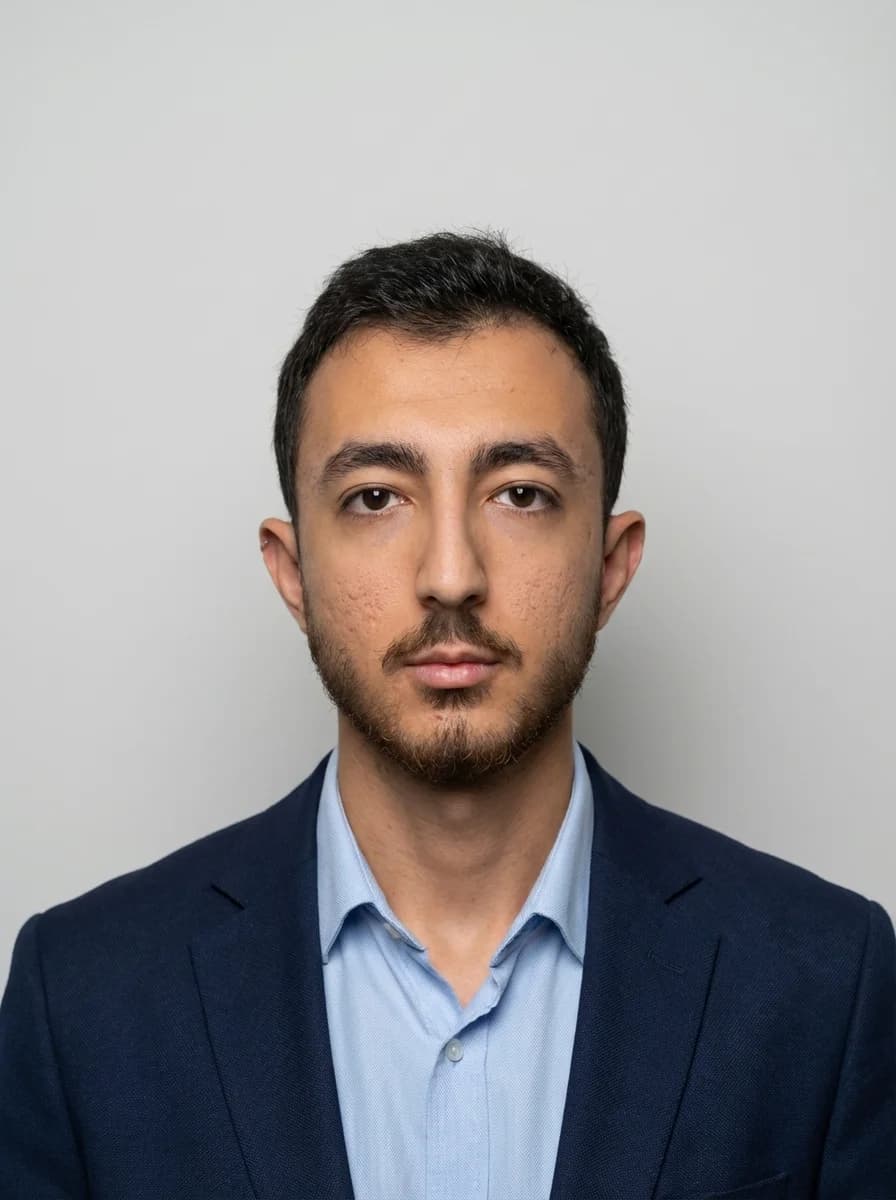
Corporate ID Photo Generator - AI Prompt for Professional Employee Badges
How to Generate This Image
Set up your AI model
Access Gemini 3 Pro Image or any compatible AI image generation tool
Configure generation parameters
Use the settings shown in the parameters section below
Enter the prompt
Copy the prompt text below and paste it into your AI tool
Generate the image
Click generate and wait 30-60 seconds for your AI-generated image
Prompt
Create a modern corporate ID photo of the person from the uploaded image, suitable for company badges and internal systems. Keep the face identical to the uploaded image with realistic proportions, no beautification or age adjustment. Neutral centered head and shoulders composition, subject looking straight at camera with neutral but friendly expression. Plain uniform light gray background with no texture or gradient. Even soft lighting with minimal shadows, high clarity and sharpness, natural skin tones, high-resolution. Transform clothing into business casual with collared shirt that matches corporate environment, no visible logos or patterns. Professional ID badge quality photo.
AI Model
Gemini 3 Pro Image
Generation Parameters
Tags
Metadata and Statistics
About the Author
Expert curators and creators of AI prompts, specializing in professional photography, corporate tools, and HR technology solutions. Helping businesses create professional visual content.
Frequently Asked Questions
What is a corporate ID photo and why do companies need them?
A corporate ID photo is a professional headshot used for employee identification in company systems, security badges, access passes, HR databases, and internal directories. Companies need standardized ID photos to maintain security, professional appearance, and consistent employee records across all corporate systems. These photos must be immediately recognizable while meeting professional quality standards.
How is this different from regular photo editing or beautification apps?
Unlike consumer apps that apply beautification filters and artificial enhancements, this corporate ID prompt prioritizes facial accuracy and authenticity. It maintains exact facial features, skin texture, proportions, and age-appropriate appearance from the original image—critical for identification and security purposes—while upgrading only the technical quality (lighting, background, composition, attire) to professional standards.
What background color should I choose for corporate ID photos?
The best background color depends on your company's branding guidelines. Light gray (#E8E8E8) is the most versatile and professional choice, working well for most corporate environments. White is clean and minimalist, light blue suggests technology or healthcare sectors, and neutral beige offers warmth. Choose solid colors without texture or gradient, and ensure good contrast with the subject's attire and skin tone.
What type of business attire is appropriate for corporate ID photos?
Appropriate attire depends on your company culture. Business formal (suits with ties, blazers with blouses) suits executive and traditional corporate environments. Business casual (collared shirts, professional tops) works for most modern offices. Smart casual (polo shirts, neat sweaters) fits creative or tech companies. All options should avoid visible logos, large graphics, or distracting patterns to keep focus on facial identification.
Can I use these AI-generated photos for security badges and access passes?
Yes, photos generated with this prompt are specifically designed for corporate ID badges, security credentials, and access control systems. The prompt ensures facial accuracy without artificial enhancement, meeting identification requirements while providing the professional quality, neutral background, proper lighting, and appropriate composition needed for security and access control purposes.
How do I ensure the AI maintains facial accuracy without beautification?
The prompt explicitly emphasizes 'no beautification', 'realistic proportions', 'maintain exact facial features', and 'natural skin texture'. When using AI platforms, increase reference image strength (0.85-0.95), use face-matching tools like ControlNet for Stable Diffusion or --cref for Midjourney, and add negative prompts specifically excluding 'beautification, smoothing, filters, enhancement, age adjustment'. Always verify the output matches the original face exactly.
Share this prompt
Share this prompt on social media or copy the link to share with friends